
Knowledge Base |
OTM SDL TRADOS Studio Connector for Windows
Installation Manual
As on: February 2013

System requirements
- Operating system: Microsoft Windows Version XP SP3 (32 / 64 Bit) or higher
- Installation of a valid license of SDL Trados Studio Professional 2009 or SDL Trados Studio Professional 2011
- Active OTM user account (PM / Admin)
Installation
User interface language: English
Windows XP, Windows 7 and Windows 8:
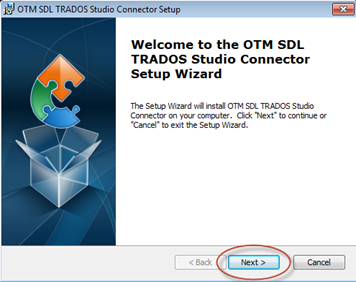
Start the installation by double clicking on the installation file.
Then click on Next:
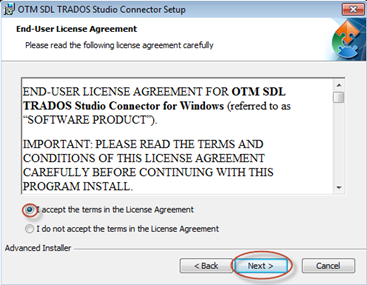
Please read the End User License Agreement, select I accept the terms in the License Agreement and click on Next:
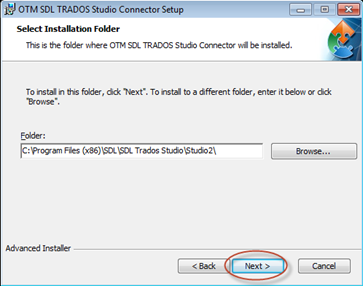
Click on Next in the next dialogue field WITHOUT changing the path:
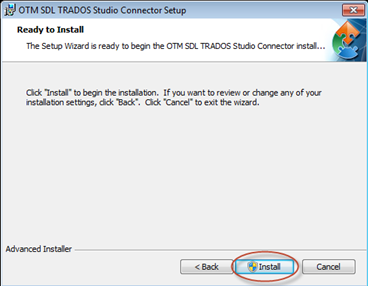
Click on Install to install OTM SDL TRADOS Studio Connector:
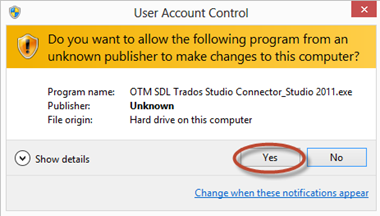
Confirm the Windows security query with Yes:
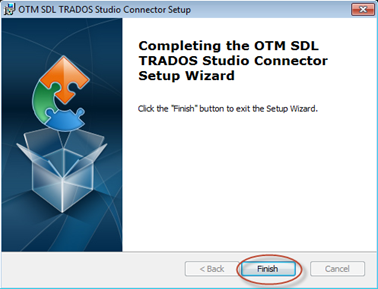
Click on Finish to complete the installation of OTM SDL TRADOS Studio Connector:
Start OTM SDL TRADOS Studio Connector by double clicking on the icon on your desktop:
Copyrights
OTM® is a registered trademark of LSP.net
SDL TRADOS® is a registered trademark of SDL
OTM – Development and Updates
|
Any questions about our products?
Please feel free to contact |


"LSP", "OTM" and "Quality Translation Network" are registered trademarks of LSP.net Holding GmbH!
